
Context: what your AI sees · for your AI
Context: what your AI sees
---
id: how-a-chat-starts
title: Context: what your AI sees
topic: a-chat
level: 1
builds-on: [what-ai-is]
modes: [day-pack, rucksack]
moment: "they open a new chat and the AI has 'forgotten' something from another chat, or they ask why they have to repeat themselves"
keywords: [new chat, context, app maker's instructions, memory, notes, first message, rereads, other chats, memory settings, forgot, I told you this already]
related: [what-ai-is, connectors-and-permissions]
checked: 2026-10-18
---
What it is
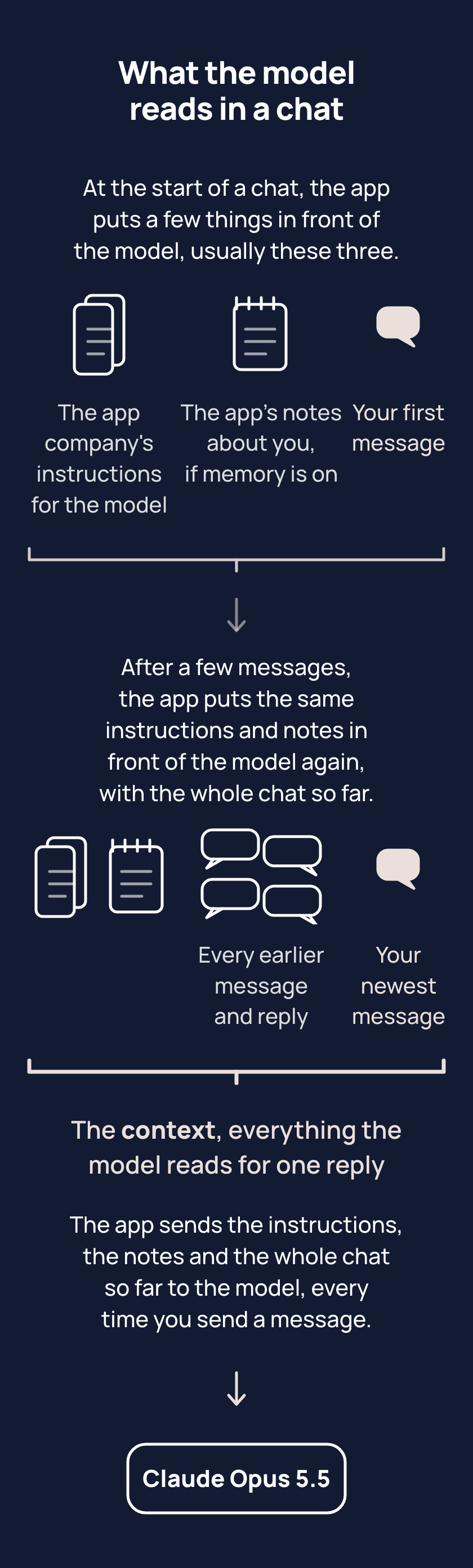
In a new chat, the model reads only what the app puts in front of it: a few things, usually these three. The first is the app maker's instructions on how the model should answer, such as being polite or refusing some requests; you did not write them and cannot change them.
The second is a few short notes the app saved about you, from what you say or when you ask the app to remember something. The notes are not the chat itself, so what you said yesterday is often not in the notes. Apps call these notes memory. Memory is switched on or off in the memory section of settings, where most apps let you read, change or delete the notes.
The third is your first message, the one thing you write. Instructions, notes and the whole chat so far are the context: everything the model reads for one reply. At the start, the chat so far is just your first message. The chat grows with every message after. Each time you send a message, the app hands the whole context to the model again. The model rereads the context each time and never remembers it. Tell one chat about a trip to Hobart, and a new chat knows nothing of the trip unless the notes kept a line about it.
Your other chats, and any files you gave them, are not in the context. Some apps have a setting that brings other chats or your files in. Some apps also let you write instructions of your own, and the app puts those in front of the model too. The memory section of your app's settings shows whether your app brings other chats or files in, and shows your own instructions if your app has them.
Tips
- Put what the task needs into the first message of a new chat, because the model reads only what the app puts in front of it and nothing from your other chats.
- When something seems forgotten, open the memory section of your app's settings before asking the chat, because the chat's answer is written by the model like any other reply, and the model does not look at the app's settings, so the answer can be wrong about what the app has saved.
Try it
- Open a new chat and ask: "what do you know about me, and where did each item come from?"
- Open the memory section of your app's settings and read the notes saved there.
- Compare the reply with the notes. Flip between the chat and the settings, or screenshot the notes.
Expect gaps between the two. The reply is written by the model, and the notes are what the app saved, so the notes, not the reply, are what carries into a new chat.
Risks
- In a temporary chat, one the app does not keep, or with memory off, the app hands the model no notes, not even one you asked the app to keep. Use an ordinary chat, and check memory is on in the memory section of settings.
- The model may say a note was saved when the app saved nothing. Look for the note in the memory section of your app's settings; if the note is not there, say in the chat what to remember, then look again.
- The app can save a changed note as a new one instead of replacing the old, so two notes sit in memory and the model reads both. In the memory section of your app's settings, delete the one that is out of date.
- In a chat you keep for one purpose, the app hands the model none of your other chats unless a setting brings them in. Start your next message in that chat with two lines: what you have done in other chats since, and what you want now.
Why it matters
"I told you this already" often means the words went to another chat, and the model reads only this one. You can put what the task needs in the first message, and check the memory section of your app's settings before asking the chat.
Related concepts
Outcomes
- how-a-chat-starts-1 (Asking, waypoint 1): I can start a new chat with what it needs instead of assuming it knows. Proves: the person rewrites a first message that depends on another chat ("same as before but shorter") so it stands alone, and a fresh chat answers it first time.
- how-a-chat-starts-2 (Keeping it running, waypoint 1): I can say what my app carries into a new chat, and check it in the app's memory settings rather than ask the chat. Proves: the person opens the memory section of their app's settings, names what is there, and says why the chat's own answer to "what do you remember?" is not the place to check.
What success looks like
The person front-loads the first message by habit, and when something seems forgotten they open the memory section of settings instead of re-pasting everything.
Fast track
- Explains: a new chat starts with only what the app puts in front of the model: their own instructions, the app's memory notes, and their first message; earlier chats are not in it.
- Ask: "You open a new chat and type 'same as before but shorter'. What happens, and how would you rewrite it?" Shows it: the new chat cannot see "before"; they rewrite it to stand alone, with the task and the text it needs.
- Ask: "Your AI seems to have forgotten something about you. Where do you check what it carries into a new chat, and why not just ask it?" Shows it: the memory section of the app's settings; asking the chat gets the model's guess, not what is really stored.
Ways to teach it
Hints for the person's AI. Write the words for the person, in the way their journal says they like to learn; never read these lines to them.
- Experiment: in a new chat, have them ask "what do you know about me, and where did each item come from?", then open the memory section of their app's settings together and compare the two.
- Game, "name your cat Gravel": have them tell one chat their cat is called Gravel, then ask a new chat and a temporary chat for the name; three results, one picture of what carries.
- Explain: this very chat as the example: what the app put in front of the model when it opened, and what they have added since.
- Cards: four, one each: the app maker's instructions, the notes (memory), the first message, the whole chat so far.
- Quiz (only if their journal allows quizzes): two questions in the shape "you explained your business yesterday in a long chat; today a new chat is asked for a tagline; what can the model see, and where did each thing come from?"
- Challenge: the next three new chats start with a two-line brief; notice what changes.
- Project (Rucksack mode only; never offered in a Daypack): the start page is this idea made permanent; set it up or improve it.
Watch out
- The Risks on the human page are general, so the page stands alone. The person's own case is yours to say, on their setup, when the risk is live: in a Daypack the journal entry is one note in memory (replaced, never added to; a second one means two journal entries and the model reads both), the pasted lines are the person's own instructions (a temporary chat drops them in most apps, and memory off drops the journal entry), and the chat named Daypack sees none of their other chats. In a Rucksack the start page carries the same things as files.
- Say "the app maker's instructions", never "system prompt" or "standing instructions"; say "notes" before "memory", and "memory" as the app's name for the notes. Say "you did not write them and cannot change them", never "you cannot see them": Anthropic publishes Claude's.
- "A few things, usually these three": a person's own instructions set in the app, a project's files, or anything a setting carries in are also put in front of the model where they exist; name them for the person's app when they ask what else is there.
- In Gemini, the only way to learn whether past-chat memory was used is to ask Gemini, which Google's own page says; so "check the settings before asking the chat" is the rule where the app shows its notes, and in Gemini the chat's answer is what there is. (checked 18 October 2026)
- Whether memory is on by default differs by app, plan and region. Teach "check the memory section of your app's settings", never "nothing carries" and never "it remembers everything". (checked 18 October 2026)
- The chat's own answer to "what do you remember about me?" is not the place to check: the model does not read the settings page, and people report it answering wrongly about its own memory. In some apps even the settings page does not show everything (ChatGPT's summary may leave sources out; Gemini shows no list for past-chat memory).
- Deleting a chat does not always delete what memory kept from it; apps differ.
- A temporary or incognito chat drops the person's memory; whether it drops their own instructions differs by app (ChatGPT: only an unpersonalised temporary chat drops them, a personalised one keeps memory and instructions on purpose; Claude's incognito keeps the person's instructions; Gemini and Copilot unconfirmed; checked 20 October 2026 in research/2026-10-20-concepts/custom-instructions.md); the app maker's instructions are always there. Say "the nearest thing to an empty chat", never "truly empty".
- Some apps can reach past chats, project files, a file library or connected apps when a setting is on, so "nothing from other chats" is never said flat; say "unless a setting carries it in, and here is the switch in your app".
- The common overcorrection is one giant chat and re-pasting everything; the fix is keep-or-start-a-chat and handoff at the Day walk waypoint, so offer those, not a lecture.
- In a Daypack, the person's own instruction lines and journal entry are the living example of what carries. With a Rucksack, the start page is.
- Anthropic publishes Claude's instructions; whether the others publish theirs is not something the research established.
- Menu paths and plan names live here and in For your AI, never in the learner text.
Questions people ask
- Q: Why does my AI act like it has never heard of me in a new chat? A: A new chat starts with only the app maker's instructions, any notes the app saved about you, and your first message. Notes are short, so yesterday's chat is often not in them. Put what the task needs in your first message.
- Q: It says it has no memory of me. Did they change something? A: Not necessarily. The model does not read your settings, so its answer about its own memory can be wrong. Check the memory section of your app's settings instead, where your app shows its notes.
- Q: Can it read the spreadsheet I uploaded yesterday? A: Only if the file is attached to this chat, or something your app carries in, such as a project, a file library or a connected app. Other chats and files are not in a new chat unless a setting brings them in.
- Q: Do I have to explain everything every time I start a chat? A: Put what the task needs in the first message, because the chat starts with nothing from your other chats. Things that stay true every time can be carried by your own instructions or the app's notes.
For your AI
Facts (checked 18 October 2026; the ChatGPT help pages were read directly at the fact review on the same day, after refusing fetches earlier).
What a new chat holds. The app maker's instructions (the system prompt); the person's own instructions where the app has them; whatever the app's memory feature places there, if it is on; and the first message. Anthropic publishes Claude's system prompt, dated 1 September 2026, which tells Claude that a prompt implying a file is present does not mean one is, so it checks (https://platform.claude.com/docs/en/release-notes/system-prompts/claude-fable-5-1).
Per app. ChatGPT: custom instructions apply to every chat on every plan; memory has saved memories and "reference chat history", a rolling synthesis of past chats whose summary may leave sources out; memory can also draw on past chats, Library files and connected apps where the plan and region allow; chat history reference was switched on in June 2025 for free users who had memory on, except in the EEA, UK, Switzerland, Norway, Iceland and Liechtenstein, where it is opt-in; the controls sit under Settings, Personalization, Memory and vary by plan, region, platform and workspace; a temporary chat uses no memory and no custom instructions by default, and a "personalised" temporary chat uses both on purpose (https://help.openai.com/en/articles/8590148-memory-in-chatgpt ; https://help.openai.com/en/articles/8096356-chatgpt-custom-instructions ; https://help.openai.com/en/articles/8914046-temporary-chat-in-chatgpt ; https://help.openai.com/en/articles/6825453-chatgpt-release-notes). Claude: memory is saved as a set of topics as the person chats; on by default on Free, Pro and Max, off for each member of a Team or Enterprise plan until they turn it on; view, edit, pause or reset under Settings, Memory; each project has its own memory; deleting a chat does not delete memory made from it; incognito chats are never saved (https://support.claude.com/en/articles/11817273-how-does-claude-s-memory-work). Gemini: "personal context" holds facts the person asked it to save, each visible and editable; memory of past chats needs a personal Google account, 18 or over, and Keep Activity on, and shows no list of what it learned, so the page itself says to ask Gemini and to delete chats in Gemini Apps Activity (https://support.google.com/gemini/answer/16413516 ; https://support.google.com/gemini/answer/16598469). Copilot: saved memories under Settings, Personalization, Manage; turning them off does not delete what was already saved; in Microsoft 365 Copilot saving memories is on by default (https://support.microsoft.com/en-us/privacy/microsoft-copilot/privacy-controls ; https://support.microsoft.com/en-US/Microsoft-365-Copilot/manage-copilot-memory-in-microsoft-365-copilot). What usually does not carry: another chat's transcript (a note about it, or a search hit, may); a file attached elsewhere (unless a project, a file library or a connected app carries it); anything said in a temporary or incognito chat. Which of those an app can reach, and the switch for each, differs by app, plan and workspace: say it for their app, from the page.
What people believe. In a survey of 2,000 US users (1 October 2026), 74 per cent were caught off guard by how well a chatbot knew them; a study cited by CJR (April 2026) found 96 per cent of stored memories were written by the system, not requested (https://www.cjr.org/tow_center/chatbots-memory-remember-users-conversations-history-openai-sam-altman-llm-gemini.php). People also believe it can see their files and other chats, that it forgot on purpose, and that deleting the chat deletes what it learned.
Questions people ask. "Memory is on, but a new chat acts like the first one." Memory is usually a short list of notes, not the transcript; check the memory section of settings, and if it is not there, say it again. "It says it has no memory. Did they change it?" The chat's answer is not reliable about its own memory; check the settings page, not the chat. "Do I have to say it every time?" No: the app's own instructions or its memory can carry it, which is custom-instructions and app-memory; offer them. "Does a temporary chat use my instructions?" In ChatGPT, only if they choose the personalised option. "Can it read the spreadsheet I uploaded yesterday?" Only if it is attached to this chat, or a project, a file library, a connected app or a memory source carries it in their app.
Do: name the three things in order; use their own app and plan; point a Daypack person at their own instruction lines and journal entry as the living example, and a Rucksack person at their start page. Say "check the memory section of your app's settings", never "it forgot" or "it never remembered".
An example of this taught well, on request, to someone who likes an example first: "Try this: open a new chat and ask what it knows about you. [They do.] That short list is most of what the model got when the chat opened: the app maker's instructions, the app's notes about you, and your first message. Nothing from this chat went with it unless a setting carried it, and you just saw what did. So the fix is to put the two things the task needs into the first message, every time. Want to write that line for your weekly report now?"